1
Platform fit comes before platform capability
Ignition suits greenfield sites, multi-site rollouts and data-heavy plants. A Rockwell-heavy estate or a well-supported legacy SCADA can justify staying put, so the fit is assessed site by site.
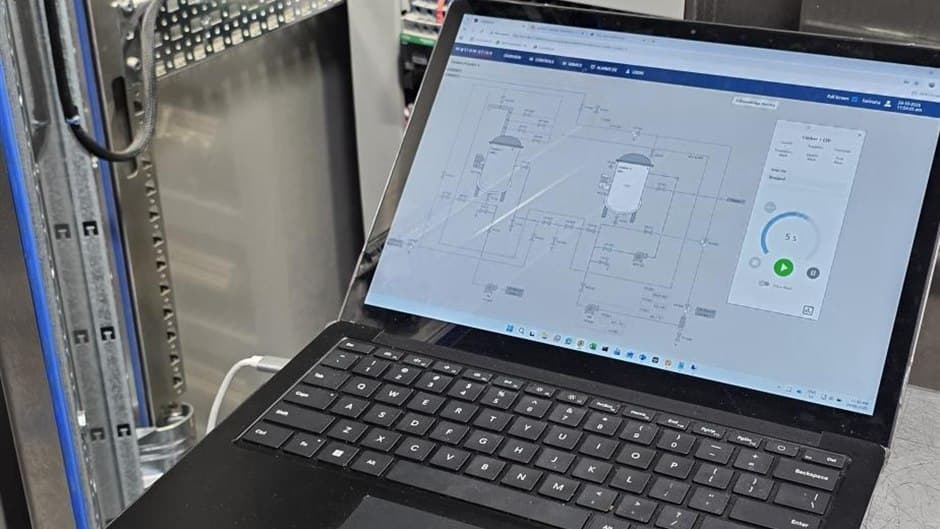
Ignition suits greenfield sites, multi-site rollouts and data-heavy plants. A Rockwell-heavy estate or a well-supported legacy SCADA can justify staying put, so the fit is assessed site by site.
Browser-based clients make Perspective the default for all new projects. Vision, the older thick-client module, is being phased out and should not be chosen for new greenfield builds.
A planned tag model, restrained polling, OT segmentation and a staged commissioning sequence matter more to a successful Ignition deployment than any single platform feature.
Ignition by Inductive Automation has become one of the breakout platforms in modern SCADA. It takes a different path from traditional systems by building on current IT technologies, which makes it lightweight to deploy, unusually broad in what it can connect to, and quick to stand up. For many plants it can cover most of what a factory wants from a supervisory system, from operator screens to historian, reporting and integration with business systems, and it gets there fast. Metromotion Controls is an Ignition Gold Certified Integrator based in Mount Waverley, working with food and beverage manufacturers across Melbourne, Victoria and Australia. This guide sets out where Ignition fits well, where it is one of several sound options, and where another platform serves a site better, so the platform decision stays a question of fit rather than default.
This post supports our PLC, SCADA and HMI programming service, where Ignition SCADA delivery, Perspective and Vision work, historian and reporting, and legacy SCADA migration all sit.
The right SCADA platform is the one that fits the existing PLC estate, the IT constraints and the in-house support skills, not the one with the longest feature list. Four characteristics decide most of the fit.
A server-based licence with no per-tag, per-client or per-screen fees. For sites with many workstations or large tag counts, the cost profile stays predictable as the system grows.
Perspective runs in a web browser and on mobile devices with no client installation, so operator access from tablets, office PCs and phones is straightforward.
Native MQTT and Sparkplug support, a built-in historian and cloud connectors suit sites that need plant data connected to business systems, reporting tools or analytics.
Sepasoft MES and Batch Procedure modules extend Ignition into ISA-88 batch control, OEE and recipe management on the same database and tag structure as the SCADA layer.
Ignition is the clear choice on greenfield sites, on multi-site deployments where centralised architecture and predictable licensing pay off, and on sites that need plant data flowing to business systems. Other platforms can be the better fit on Rockwell-heavy sites with established FactoryTalk infrastructure, and where a heavily customised AVEVA or Citect system still holds real value. For sites weighing a move off Citect or Geo SCADA, see our Citect and Geo SCADA migration guide. The migration question is covered below.
Perspective is the browser-based client module and the right choice for new work: it runs on any device with a browser, scales across screen sizes and needs no installed software. Vision is the older thick-client module and is being phased out, so it should not be considered for new greenfield builds or projects. It remains on many existing systems, where it is still supported, but new work should be designed on Perspective from the start.
Build any new plant on Perspective. Treat Vision only as something you may inherit on an existing site, not as an option for new design.
A single site can run a standalone gateway polling the PLCs directly, the simplest pattern for one plant with a manageable device count. As sites grow, or where a Unified Namespace is the goal, Edge gateways at the line or area publish over MQTT and Sparkplug to a central gateway, decoupling the field devices from the central system.
Two design points carry most of the risk:
Ignition runs redundancy as a Master and Backup pair sharing the same configuration: when the Backup connects, it synchronises with the Master so both hold the same project and tag setup. The behaviour at switchover is set by the Standby Activity Level:
Where a SCADA outage stops or risks the process, warm standby usually justifies the load. For reporting-focused deployments, cold standby is often the better balance. The choice belongs in the architecture phase, because it affects device load, network sizing and the failover time operations can expect.
Most Ignition projects that disappoint do so for reasons of process and design rather than the platform itself.
A good alarm system gives the operator a short list of valid, prioritised alarms that each require a response. That outcome is what the ISA-18.2 alarm-management lifecycle is built to produce, running from alarm philosophy and identification through rationalisation, design, implementation, operation, maintenance and monitoring. Ignition supplies the technical pieces: prioritisation, shelving, notification pipelines and an alarm journal. The decisive work is rationalisation, done with the process and operations team, where each alarm is justified, prioritised by consequence and time to respond, and stripped of duplicates and nuisance triggers. Designing to ISA-18.2 from the start is far cheaper than retrofitting it onto a plant where operators have already learned to ignore the screen.
An Ignition deployment lives on the operational technology network, so its security depends on the surrounding design: segment the control network from business systems, keep reporting paths outbound-only where possible, and control remote access. This work overlaps with OT network security.
The Purdue model, which underpins ISA-95, places the pieces. Field devices, PLCs and safety controllers sit at Levels 0 and 1. Ignition operator clients and the supervisory functions sit at Level 2. The gateway, tag historian and MES connections sit at Level 3. A Level 3.5 DMZ between OT and IT is where reporting paths and MQTT brokers terminate, rather than letting enterprise systems reach into the control network directly.
IEC 62443 formalises that layout into zones, groupings of assets with a common security requirement, and conduits, the controlled communication paths between them. Each zone is assigned a target security level from SL 1, protection against casual or coincidental misuse, to SL 4, protection against a sophisticated and well-resourced attacker. The practical effect is that the supervisory zone gets a defined target level, and every conduit in or out of it, including remote access and reporting, is identified and given controls that meet it.
Ignition is licensed by the server, with annual support priced as a percentage of the licence. Inductive Automation describes this as unlimited licensing: the licence does not cap tags, clients, screens or device connections, so the practical limit becomes the gateway hardware, the database and the network. That is why gateway sizing and polling discipline matter so much on large deployments. Pricing is quote-based and terms change, so confirm them with the vendor at the time of purchase.
Since 2023, Ignition has been sold and supported locally by Inductive Automation Australia, the vendor's wholly owned subsidiary and its first office outside the United States, which took over from the former distributor iControls.
Migration is a project in itself: tag migration, graphics rebuild, historian reconnection and operator retraining are real costs to weigh against the value the current system still holds. Our automation upgrades work covers staged migration that keeps a live plant running through the change.
This mirrors the method we use on every project, covered in our commissioning service. Mixed-vendor connectivity and the data flow up to MES and ERP sit with our systems integration work.
PLC logic, SCADA architecture, HMI upgrades, fault finding and historian integration for production sites.
Ignition Gold Certified System Integrator for Ignition SCADA, historian, reporting and MES functions.
OEE, reports, quality, CIP, maintenance and energy data from the team that builds and programs the lines.
Automation, traceability, CIP, SCADA and production data for Australian food and beverage plants.
Automated inventory tracking integrated with production controls for real-time stock visibility and traceability.
The MES functions a mid-size food plant uses, what it can skip, and whether to build on Ignition or buy enterprise MES.
Upgrading AVEVA Plant SCADA or Geo SCADA in place, or migrating to Ignition, with a staged cutover that keeps operators in control.
Ignition, FactoryTalk and AVEVA compared for Australian sites: licensing, architecture, clients, IIoT, redundancy and where each platform fits.
Key point
The existing estate usually decides the platform
Published 3 June 2026
A practical guide to Citect (AVEVA Plant SCADA) and Geo SCADA (ClearSCADA) migration on Australian sites: upgrade in place or move to Ignition, and how to cut over without losing visibility.
Key point
Upgrading in place is a real option
Published 25 Sept 2026

A practical ISA-88 guide for Australian food and beverage plants: when batch control pays off, the three models, phase states, FSANZ traceability and migration.
Key point
ISA-88 gives batch control a consistent structure
Published 9 May 2026
Tell Metromotion Controls about the work you are planning and speak with an engineer about the next steps.